prostir zvuku

my own project

Spatial sound mixer

macOS / iOSOpen product
prostir zvuku
Role: Founder, product designer and developerPlatform: Native macOS and iOSScope: Product strategy, UX/UI, motion, development and launch

prostir zvuku is a spatial nature sound mixer for focus, rest, and sleep. Instead of reducing a soundscape to a list of volume sliders, it lets people place rain, fire, ocean, birds, and streams around themselves and shape a room by distance and direction.

I took the product from the first interaction model through the complete UX flow, native Mac and iPhone apps, monetization, launch, and continuous iteration. The same saved rooms move between devices through iCloud while each platform keeps the controls that fit its context.
From a mixer to a place

The central product decision was to make space the interface. A sound is not an abstract row with a slider: it becomes an object on a canvas. Moving it closer changes its presence; moving it left, right, or behind changes where it is perceived.

That direct manipulation makes a technically complex audio system understandable without exposing the underlying parameters. The canvas becomes both the control and the mental model of the room the user is building.

01

Direct

Drag sound sources where they should live instead of configuring channels.

02

Spatial

Distance and direction replace a conventional stack of mixer controls.

03

Calm

The interface stays quiet while motion confirms every meaningful action.

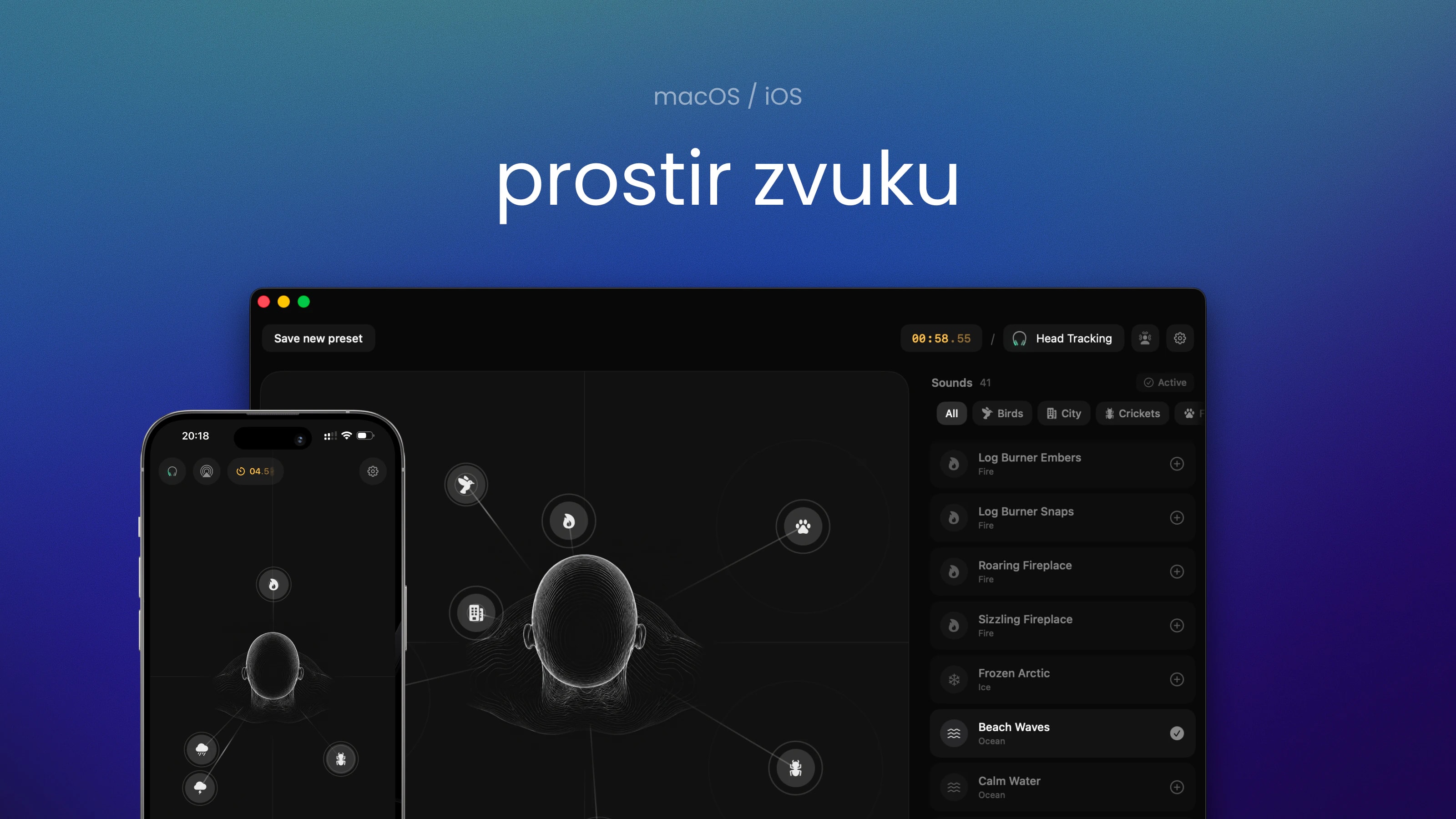
The macOS spatial canvas combines positioning, the sound library, timer, output, and head tracking in one workspace.

A complete product flow

The work covered the whole journey rather than a single editor screen. Each step had to teach the spatial model without interrupting the calm character of the product.

  1. 01

    Discover

    Explain the difference from a conventional sound mixer before asking for setup.

  2. 02

    Onboard

    Introduce placement, distance, playback, and head tracking through progressive actions.

  3. 03

    Build

    Browse sounds, add layers, position them, and hear every change immediately.

  4. 04

    Keep

    Save rooms and synchronize them between Mac and iPhone through iCloud.

  5. 05

    Return

    Resume or switch a room from the notch, menu bar, Lock Screen, or Dynamic Island.

  6. 06

    Upgrade

    Move from a genuinely useful free experience to Lifetime Pro without a subscription.

Onboarding system

Teach the model through interaction

The onboarding does not explain every control upfront. It starts with a mood, assembles a room, and then asks the user to place the first sound directly on the canvas.

Each step uses a real product state, so the final screen is already a useful room rather than a disposable tutorial. Motion, short prompts, and immediate audio feedback do the teaching together.

The full editor, without abstraction

The macOS editor keeps the canvas, sound library, timer, output routing, and room state visible as one working surface. The walkthrough shows how a room grows from one source into a layered spatial composition.

Progressive panels make detailed controls available without taking the user away from the room. The spatial model remains visible while sounds are added, moved, adjusted, and timed.

macOS · complete editor walkthrough

One room, native on both platforms

The Mac is the deeper creation surface: a large canvas, sound library, precise positioning, custom output routing, and persistent controls in the notch or menu bar.

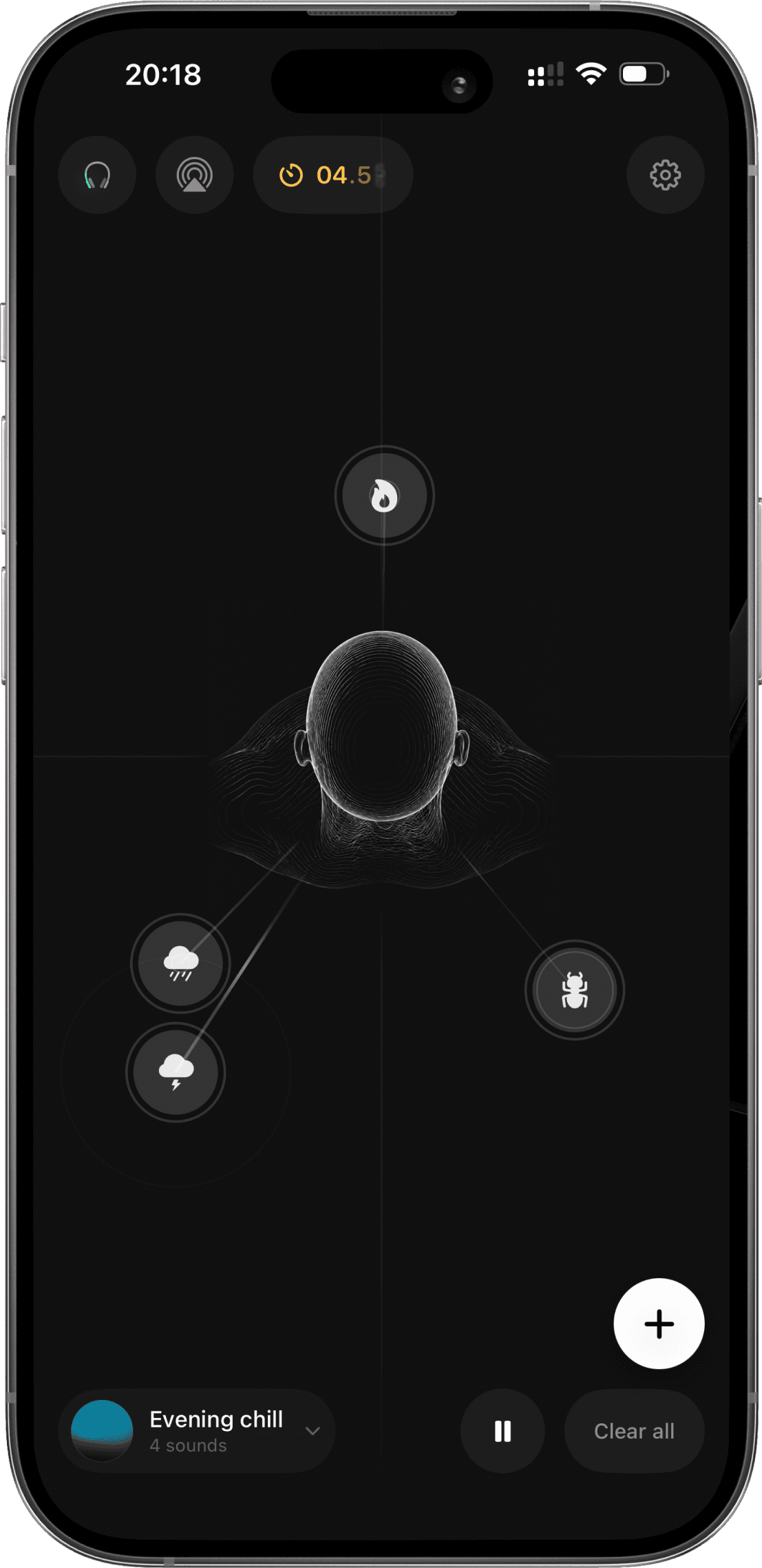
The iPhone keeps the same rooms portable. The layout is rebuilt for touch and adds system-level playback through the Lock Screen and Dynamic Island rather than shrinking the desktop UI.

macOS · quick controls
iOS · spatial room
iOS · spatial room

Motion is part of the feedback

Animation was designed alongside interaction, not added after the interface was complete. Sound-source pulses communicate playback, drag states preserve spatial continuity, and transitions make changes in distance, selection, and room state legible.

The result had to feel expressive without becoming stimulating: restrained timing, soft easing, and gradual audio fades support a product used for concentration and sleep.

iOS · spatial room choreography
Native stack

Native audio, private by default

The product uses Apple's native audio stack to keep the experience responsive and fully available offline. Spatial audio works on any output; supported AirPods add head tracking while motion data remains on the device.

  • HRTFHQ binaural
  • AVAudioEngine
  • Head tracking
  • Offline library
  • iCloud sync
  • Universal purchase

Monetization without breaking trust

I integrated RevenueCat for entitlement management across Mac and iPhone and designed the paywall as part of the product journey. The free tier is intentionally useful: people can build a real room, use spatial audio and head tracking, and understand the value before paying.

Lifetime Pro is a single universal purchase rather than a subscription. It unlocks the full library, unlimited layers and timers, saved rooms, iCloud sync, and custom output routing on Mac.

·

Free

A real spatial canvas, one sound per category, two layers, head tracking, and a five-minute timer.

·

Lifetime Pro

One purchase for the complete experience on both Mac and iPhone.

RC

RevenueCat

Shared entitlement logic, paywall iteration, and purchase-state handling across platforms.

What the case demonstrates

prostir zvuku brings together product strategy, interaction design, visual and motion systems, native engineering, monetization, and go-to-market work in one shipped product.

Its defining outcome is not a feature count but a coherent model: people build a place around themselves, then carry the same place between devices with almost no operational friction.