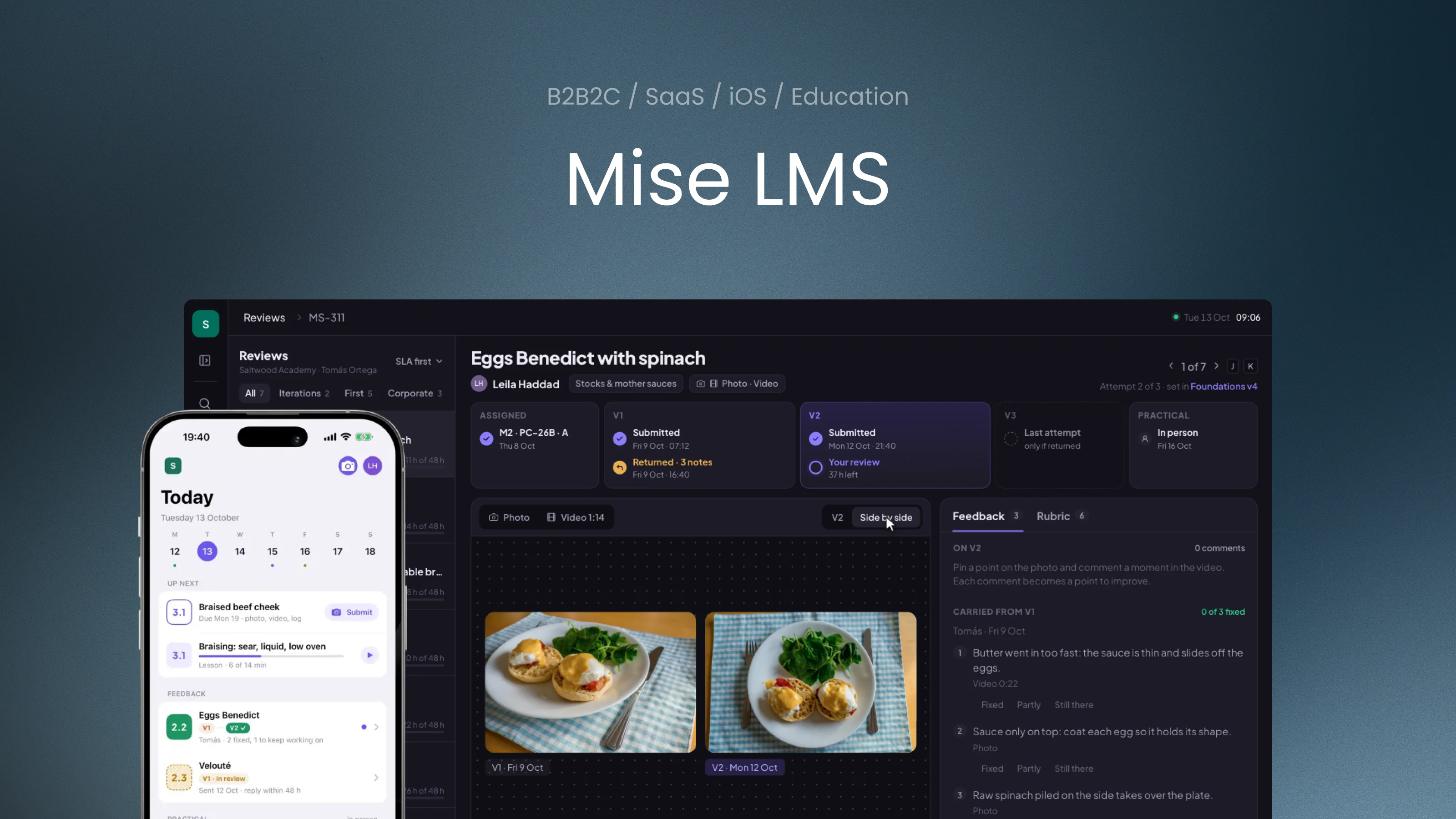
Mise LMS

A practice-first learning platform, from a single author to a corporate academy

iOS + WEB
Mise LMS
Role: Product DesignerPlatform: Self-serve education SaaS · web for authors and schools, iOS for studentsScope: Product model, roles and access, UX/UI, review workflow, analytics

Mise is a learning platform for anyone who teaches a hands-on craft, from cooking and coaching to technical trades. A single chef can open a school for weekend classes on their own. An academy runs everything in it: programmes and their content, intakes and groups, mentors and curators, practical work and its review, in-person practicals, certificates and reporting. Companies can buy the same programmes for their staff, with their own seats, roles and reports.

Most learning systems are built to deliver content: course, lesson, quiz, certificate. Mise is built around the loop that actually makes people better at a craft: attempt, specific feedback, next attempt. Content, people and analytics all serve that loop.

The platform

One system for the whole learning cycle

Nine modules share one model of programmes, people and work. An author starts with a few of them on their own; a school and a corporate academy switch on more as they grow, without moving to another system.

Three scales, one product

  1. 01 · AuthorA chef with weekend classes, a coach, a single mentor

    Opens a school alone: one programme, their own students, reviews and progress.

    • Programmes & content
    • Submissions & reviews
    • Student app
  2. 02 · SchoolAn academy with intakes and a teaching team

    Adds cohorts and groups, mentors and curators, in-person practicals and analytics.

    • + Cohorts & groups
    • + Roles & access
    • + Practicals
    • + Analytics & signals
    • + Certificates
  3. 03 · Corporate academyA company training its staff, alone or with a school

    Adds contracts, seats and locations, company sign-in and a sponsor with limited access.

    • + Corporate clients
01

Programmes & content

Modules, lessons, practical assignments and step-by-step guides. Versions keep running cohorts stable while the programme evolves.

02

Cohorts & groups

Intakes with a schedule, groups with a mentor, a curator per cohort. Students join by invitation, import or company sign-in.

03

Roles & access

Student, mentor, curator, administrator, company sponsor and custom roles. “View as” and an audit log for every access change.

04

Submissions & reviews

Photo, video, logs and written work as evidence. Pins, timecoded comments, a rubric per criterion and versions of each attempt.

05

Practicals

In-person sessions in a kitchen, gym, workshop or lab: attendance and assessment of what cannot be judged remotely.

06

Analytics & signals

Cohort progress, review times, mentor load and explainable signals about who is falling behind and why.

07

Corporate clients

Contracts, seats, locations and a sponsor role with clearly limited access. SSO and SCIM for company accounts.

08

Certificates

Programme and safety certificates with expiry dates, reminders and automatic re-certification.

09

Student app

iOS and web: a step-by-step guide at the workstation with timers, capture and upload of evidence, feedback and progress.

Product model

Progress is an accepted piece of work, not a watched lesson

Each assignment asks for evidence that can actually show the skill. The mentor reviews only what that evidence can show, the student iterates, and the curator sees where the loop slows down.

  1. 01

    Practise

    Follow a step-by-step guide at the workstation, with timers and safety checkpoints

  2. 02

    Submit

    A photo of the result, a short technique video or a log

  3. 03

    Review

    Pins on the photo, comments on the timeline, a rubric per criterion

  4. 04

    Iterate

    V2 starts from the points to fix, and the review compares versions

  5. 05

    Accept

    The step is complete when the work, not the time spent, is good enough

  6. 06

    Oversee

    Curators and companies see progress within the access they were given

Demo school

Saltwood Culinary Academy

To show the platform at work, the case follows one fictional school through a week in October. It trains professional cooks in long cohorts and runs upskilling for a restaurant group. Every screen below uses the same school, people and data.

programmes
3
students in 4 cohorts
120
mentors
8
corporate seats · Ember & Vine
40
  • Hanna LisCurator of the Foundations programme
  • Ben CarterSchool administrator
  • Tomás OrtegaMentor, sauces and knife skills
  • Leila HaddadStudent, cohort PC-26B
  • Owen PriceLine cook at Ember & Vine
  • Sofia MarinHead of kitchen training, Ember & Vine
Scenario 01 · Curator · Web

Build a course module

Hanna adds the “Mother sauces” module to the Foundations programme: a short lesson, a step-by-step guide for hollandaise and a practical assignment. She chooses what students must send, which rubric criteria apply and checks that every criterion can be judged from that evidence, then publishes a new version without disturbing the cohort already in progress.

Problem
In most LMS a course is a stack of videos and a quiz. For practical skills the important part is the assignment: what to send, how it will be judged and what counts as done.
Hypothesis
If the builder pairs each criterion with the evidence that can show it and versions the programme, curators design assessable practice and running cohorts stay stable.
What the domain says
Assessment should be designed with the taskConstructive alignment (Biggs) links outcomes, activities and assessment. Rubric research (Jonsson & Svingby) shows that explicit criteria make assessment more reliable and clearer to learners.
Mon 12 Oct14:10
All programmesDraftsArchived
New programme
ProgrammeModulesVersionCohortsStudentsUpdated
01Open the Foundations programme
Scenario 02 · Curator and administrator · Web

Launch a cohort

A new intake starts in November. Hanna creates the cohort from the programme, splits students into groups, assigns mentors with an eye on their current load and adds a corporate group for Ember & Vine from its contract. Before inviting anyone she previews what a mentor, a student and the company sponsor will see.

Problem
Launching a cohort usually happens in spreadsheets: lists of students, mentor assignments and access rules live outside the system, and mistakes appear only when someone sees too much or too little.
Hypothesis
If groups, mentors and access are set in one flow with visible load and a “view as” preview, launches become repeatable and access mistakes are caught before invitations go out.
What the domain says
Group size and mentor load shape feedback qualityThe time a mentor can give each student falls with group size. Corporate training adds a sponsor who needs progress, not the employee’s drafts.
Mon 12 Oct15:20
ActiveStarting soonFinished
CohortProgrammeStudentsGroupsStage
PC-26BFoundations v4283Module 2 of 4
E&V-1Line Cook Upskilling v2141Module 3 of 4
E&V-2Line Cook Upskilling v2121Module 1 of 4
01Create cohort PC-26C
Scenario 03 · Mentor · Web

Review work and give feedback

Tuesday morning, seven submissions in Tomás’s queue. He opens Leila’s second attempt at eggs Benedict, checks what she fixed since Friday, comments on the photo and the video, scores only what the evidence can show and accepts the work. Then he opens a corporate student’s knife-skills video and finds a cross-contamination issue that blocks acceptance.

Problem
Review in most learning systems is a grade and a text field. Feedback becomes vague, a mentor scores what the evidence cannot show, and a safety mistake can be averaged away by good scores elsewhere.
Hypothesis
If comments are attached to the evidence, the rubric knows which evidence can show each criterion and a critical criterion works as a gate, reviews become specific, honest and fast to act on.
What the domain says
Formative feedback works when it is specific and actionableFeedback research (Hattie & Timperley, Shute) points to feedback tied to the task and the next step. Carless & Boud add that students must be able to act on it, so every point carries into the next attempt.
Tue 13 Oct09:05
ReviewsSaltwood Academy · Tomás OrtegaSLA first
All7Iterations2First5Corporate3
Pick a submission from the queueIterations go first, then the longest wait.
01Open Leila’s second attempt

Student photos and video frames: Unsplash · Amos K, Oli Bekh, Cristian Guillen, Jonathan Borba, Julia Kicova, Kratky Jaromir, Andrew Konstantinov, Murphy Stay, Kristine Tumanyan

Free demo

Walk around the mentor’s workspace

The same workspace without a script. Open any submission in the queue, pin a comment on the photo, mark a moment in the video, score the rubric and accept or return the work. The rail switches to programmes and cohorts. Time stands still until you act.

Tue 13 Oct09:05
ReviewsSaltwood Academy · Tomás OrtegaSLA first
All7Iterations2First5Corporate3
Pick a submission from the queueIterations go first, then the longest wait.
Free demo · walk around the mentor’s workspace
Inside the platform

More of the system

Beyond the three scenarios, the platform covers the daily work of every role. These screens show its scale in the same demo school.

Curator homeToday’s practicals, reviews close to the deadline, signals and cohort pace.

For students

The same school, seen by the student

Students see the same programmes from the other side: what to do next, which courses to take, how their work was reviewed and how they are growing. In the demo school Leila studies in the evenings after work: on the web she plans and reads, and at the stove she switches to the phone app.

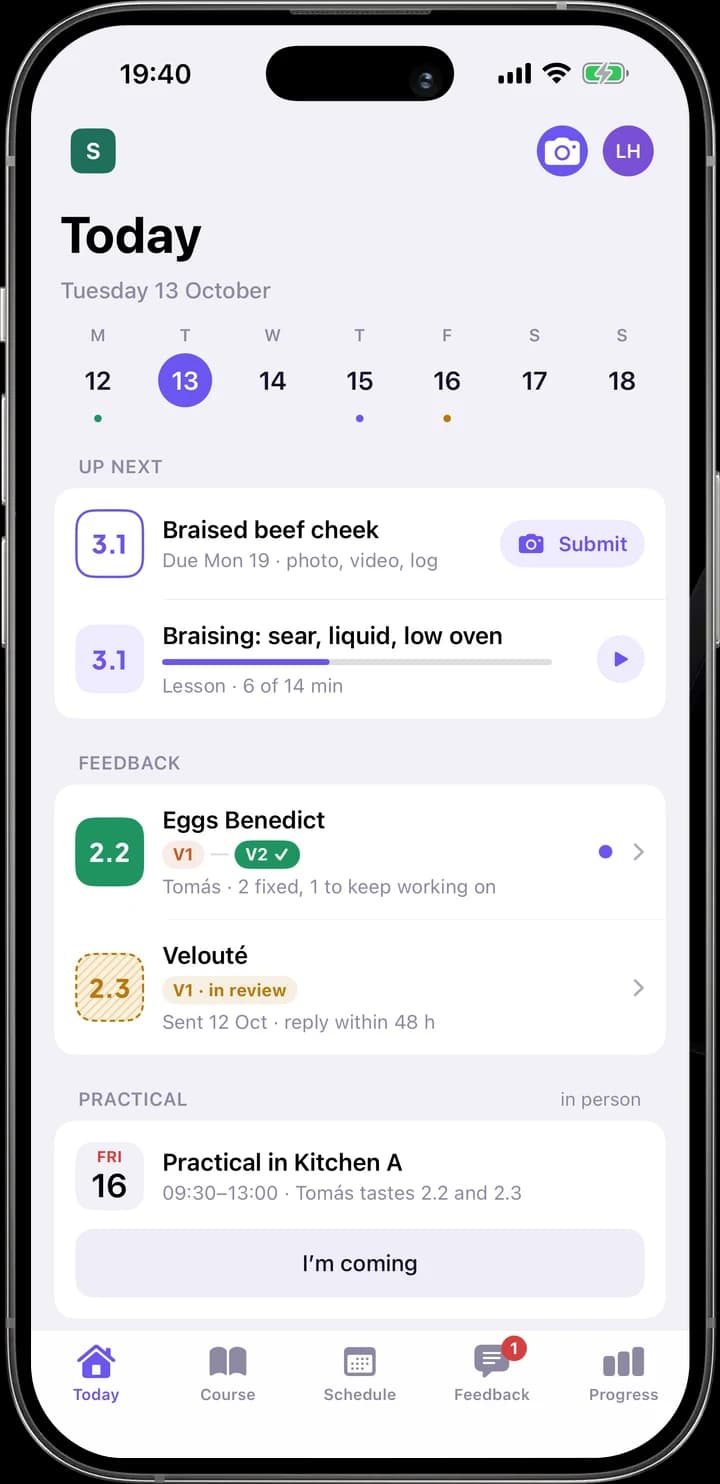
TodayThe next step first: the practical, deadlines, a new review and the lesson to continue.

Course photos: Unsplash · Tommaso Urli, Mae Mu, Ella Olsson, Sweet Life, Barbara Burgess

Student app · iOS

At the workstation, the phone does the work

Practical work happens away from a desk: at a stove, in a gym, on a site. The app keeps only what the workstation needs: the next step, the guide in a hands-free work mode, the camera for evidence and the review that comes back. In the demo school, the workstation is a kitchen.

Key screens

Today: The next practical, what is due and the new review, in that order.
TodayThe next practical, what is due and the new review, in that order.
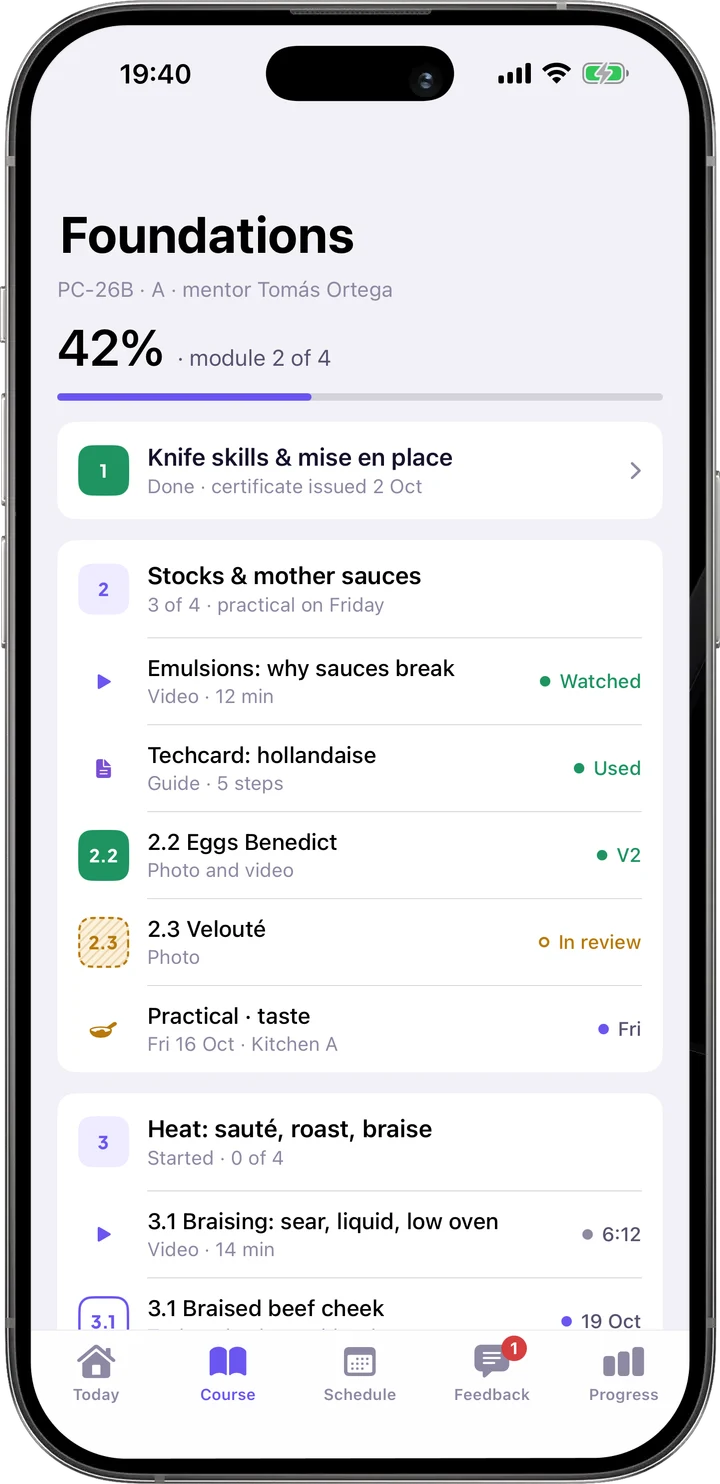
Course: Modules with lessons, guides and assignments, each with its review status.
CourseModules with lessons, guides and assignments, each with its review status.
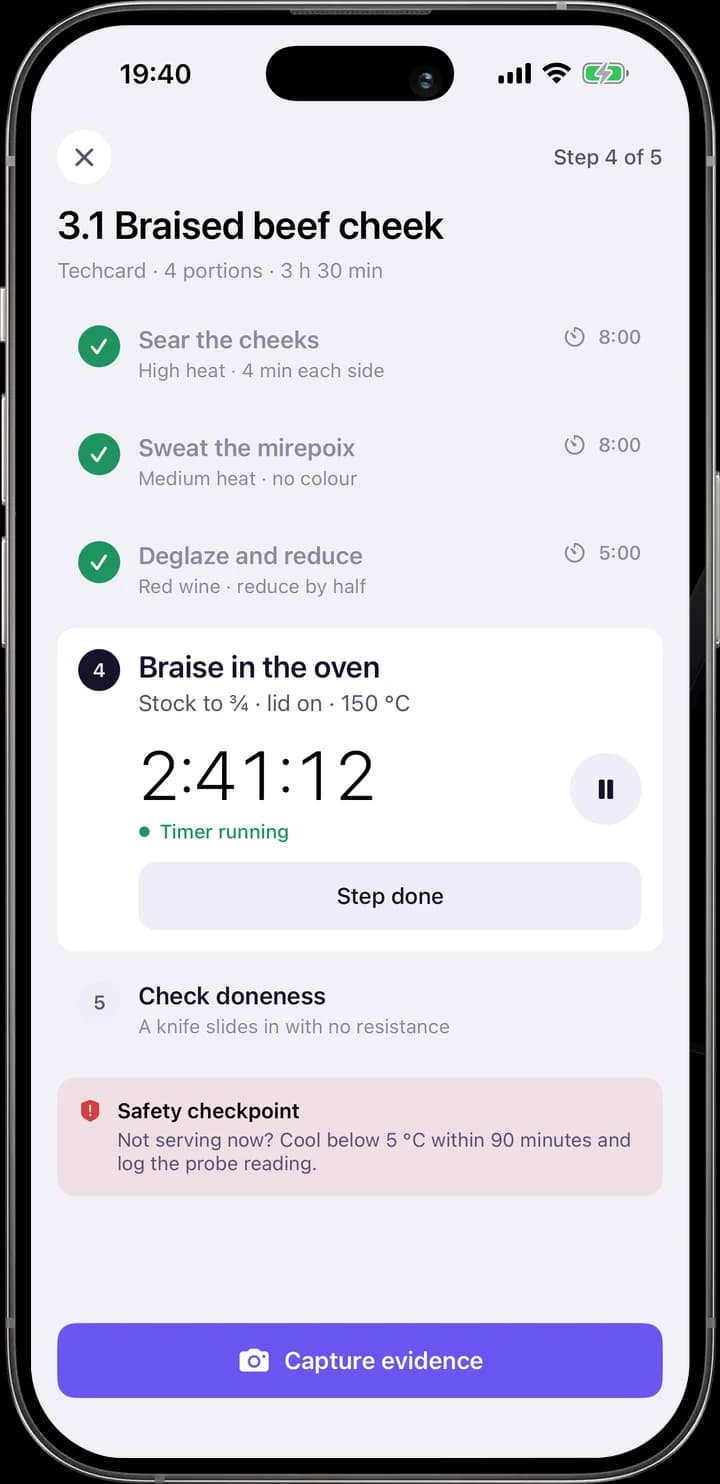
Guide: Work mode: one step at a time, timers and a safety checkpoint; in a kitchen, the guide is a techcard.
GuideWork mode: one step at a time, timers and a safety checkpoint; in a kitchen, the guide is a techcard.
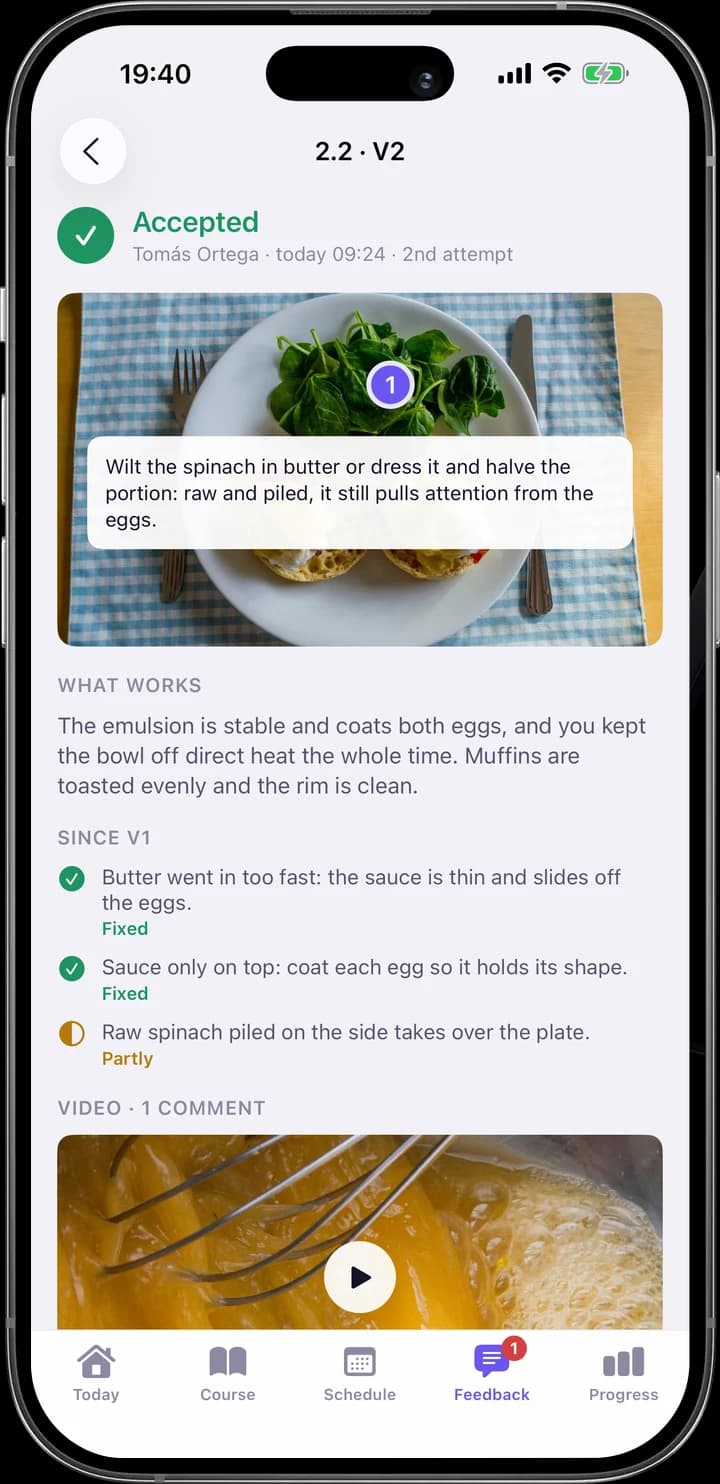
Review: What works, what changed since V1, a pin on the photo and a video timecode.
ReviewWhat works, what changed since V1, a pin on the photo and a video timecode.
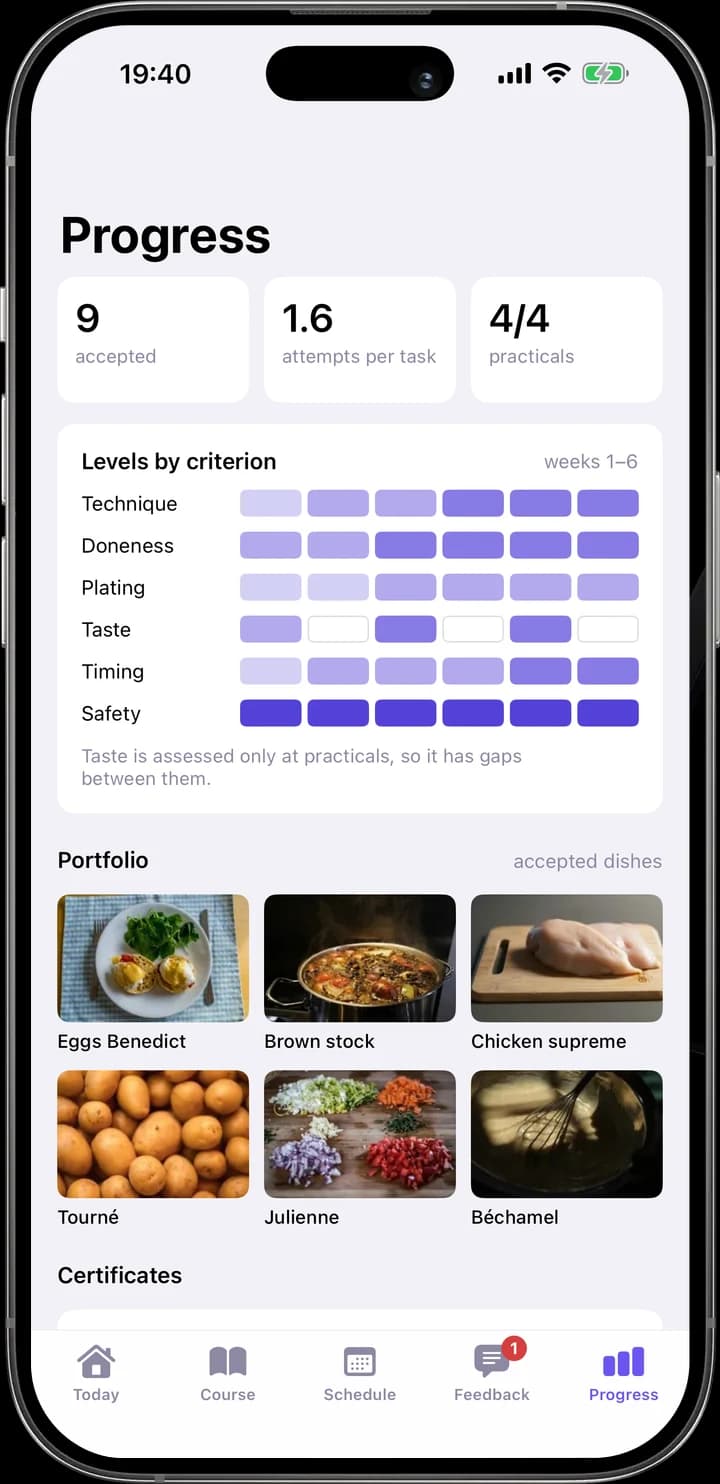
Progress: Levels by criterion over the weeks, a portfolio of accepted work and certificates.
ProgressLevels by criterion over the weeks, a portfolio of accepted work and certificates.
Two moments

The same story as in the mentor’s workspace, seen from Leila’s phone: she sends V2 on Monday night, and Tomás reviews it on Tuesday morning.

Monday, 21:05 · Leila

From a returned review to V2

Leila opens Friday’s review with three points to fix and starts V2 from it. The techcard marks the steps that answer each point, keeps the timer, and the camera asks for exactly the evidence the assignment needs: a photo from above and a video of the sauce. A short note, and V2 goes to Tomás with the points attached.

Tuesday, 09:24 · Leila

The review arrives

The notification says only that the work was accepted. Inside, Leila sees what worked, which of the three points are fixed, Tomás’s pin on the photo and his comment at 0:18 in the video. Taste can only be judged in person, so the review ends with Friday’s practical, and she confirms it in one tap.

Behind the screens

Six roles, each sees what its work needs

Access follows the work, not the org chart. A mentor sees their groups, a curator the programme, and a company sponsor sees how its people progress without opening their drafts. Every change of access and every view outside one’s own groups is written to the audit log.

01

Student

Own programme, assignments, attempts and reviews; sees who else can see their work.

02

Mentor

Assigned groups: the review queue, rubrics and in-person practicals.

03

Curator

Whole programmes and cohorts: signals, mentor load, reassignment and deadline changes.

04

Administrator

Programmes, people, roles, company contracts, certificate templates and the audit log.

05

Company sponsor

Own employees only: module progress, attendance and certificates; no work content by default.

06

Practical assessor

A custom role: assesses in-person tasks, without the history of attempts.

Who sees what

DataStudentMentorCuratorAdminSponsor
Photos and videos of workOwnGroupProgrammeWith permissionBy contract
Comments and pinsOwnGroupProgrammeWith permission—
Scores per criterionOwnGroupProgrammeWith permissionSummary
Module status and deadlinesOwnGroupProgrammeAllOwn staff
Attendance and certificatesOwnGroupProgrammeAllOwn staff
Falling-behind signals—GroupProgrammeAll—

Two surfaces, one model of programmes, people and work

The school works on the web, students mostly from their phones at the workstation. Both surfaces read and write the same programmes, attempts and reviews, so a photo taken in the iOS app is the same submission a mentor pins comments on.

School · Web

Build, run and review

Programmes and guides, cohorts and groups, the review queue, practicals, analytics and company clients.

  • Programmes
  • Cohorts
  • Reviews
  • Practicals
  • Analytics
  • Clients
Student · iOS and Web

Practise, send and iterate

Today’s next step, a hands-free work mode with timers, capture of evidence offline, reviews with pins and timecodes, progress by criterion.

  • Today
  • Work mode
  • Capture
  • Feedback
  • Progress
Shared learning service

Organisations · roles · programmes · guides · submissions · reviews · signals · certificates · audit

Design system

Dark for the people who review, light for the people who practise

Theme follows the role. Mentors, curators and administrators spend whole days in the workspace looking at photos and videos of work, so it is a dark violet-graphite room where the students’ work is the brightest thing on screen. Students open the platform between tasks, often at a workstation in daylight, so their web view and iOS app are light.

Both themes resolve the same semantic roles: one violet for action and focus, green, amber and red for the state of work. The structure is the platform’s own, not the subject’s: rounds of attempts, pinned feedback, a rubric and evidence. Plus Jakarta Sans carries the English interface; the Ukrainian page switches the whole interface to Manrope, which has Cyrillic.

Graphite surfacesDark steps with a violet tint: the rail is the deepest, the panels the lightest.
  • graphite.990#0f0e15Rail, dot-pattern viewer
  • graphite.950#121119App background
  • graphite.900#17161fQueue pane
  • graphite.850#1c1b26Panels, rounds
  • graphite.800#24222fRaised, selected row
  • paper.50#f4f3f8Student background

Text and line tiers

  • text.primary
  • text.soft
  • text.faint
  • line.strong
  • line
  • hover

Three text tiers and two line weights in each theme.

Semantic tokensScreens use roles, not hex values.

Background & surface

  • color.background.appgraphite.950
  • color.surface.panegraphite.900
  • color.surface.panelgraphite.850
  • color.surface.viewergraphite.990

Text & line

  • color.text.primarytext.primary
  • color.text.secondarytext.soft
  • color.text.mutedtext.faint
  • color.border.defaultline

Action & accent

  • color.action.primaryviolet.400
  • color.accent.softviolet.900
  • color.accent.strongviolet.200
  • color.group.corporateamber.400

Work status

  • color.status.acceptedgreen.400
  • color.status.waitingamber.400
  • color.status.returnedamber.400
  • color.status.safetyred.400
Theme by roleComponents only reference roles. Mentors get the dark values, students the light ones.
Mentor · darkStudent · light
background.app#121119#f4f3f8
surface.panel#1c1b26#ffffff
surface.raised#24222f#efedf6
text.primary#ecebf5#15122a
text.secondary#a09eb4#575370
Mentor · darkStudent · light
action.primary#8d7dff#6a56f0
accent.soft#262145#eeebff
status.accepted#4cc790#1f9461
status.waiting#e6b04a#b07a12
status.safety#ff6b6b#d63f3f
Learning statesWork status, rubric level and mentor load answer different questions, so each has its own scale.

Rubric levels

  • Emerging#2e2a4d
  • Developing#4a4096
  • Proficient#6c5ce0
  • Strong#b3a8ff

Work status

  • Waiting
  • On iteration
  • Accepted
  • Returned
  • Safety block

Mentor load

  • Current students
  • Added by cohort
  • Over limit

Same platform, another school

Cooking is the demo school. Evidence types, rubric criteria, critical criteria, guide templates and certificates are configured by each school.

SchoolEvidenceCritical criterionGuide
Culinary academyPlate photo, technique video, temperature logHygiene and food safetyTechnical card with timers
Fitness coach academyExercise video, client programmeClient safetyWorkout plan
Service technician schoolInstallation photos, on-site checklistElectrical safetyProcedure with checkpoints

Measure the practice loop, not the time spent watching

The main outcome is how quickly and how well the loop of attempt, review and next attempt works: time to the first review, how many students start a new attempt within a week of a return, and how many attempts a task needs before it is accepted.

Guardrails watch the other side: reviews with more than three points to improve, mentors above their limit for more than three days, criteria that are often not assessable from the evidence, and drop-off after the first return.

  1. 01Assignment opened
  2. 02Evidence sent
  3. 03Review started
  4. 04Review read
  5. 05Next attempt sent
  6. 06Work accepted

How the decisions would be tested

01

Mentors

Four to six mentors review real attempts in the queue and the workspace; time per review and clarity of the points.

02

Curators

Two or three curators read signals and rebalance mentors; can they explain why a signal fired?

03

Students at work

Six to eight students use work mode and capture evidence at a real workstation; can they say what to change in V2?

04

Company sponsors

Two sponsors read the report; can they say what they cannot see and why?

Principles behind the decisions

Each row starts with a finding from learning research or an open standard and ends where it shows up in the platform. Numbers lead to the sources below.

PrincipleWhat it meansDecisionWhere to see it
01Align outcomes, tasks and assessment1

An assignment should ask for evidence that can actually show the criteria it is judged by.

In the course builder each criterion shows which evidence can show it, and a gap is flagged before publishing. Taste is assessed only at practicals.

02Criteria the student can see23

Explicit rubrics make assessment more reliable, and they help most when learners know the standard before they start and can compare their own work with it.

A shared library of criteria with named levels. Students see how work is assessed and which evidence to send before they submit.

03Feedback answers three questions4

Where am I going, how am I doing, what next.

Every review has “What works”, “Since V1” and “Next time”, tied to the assignment’s criteria.

04Specific feedback, not a grade alone5

Elaborated feedback tied to the task and given in manageable amounts helps more than a score.

Comments are pinned to the photo or a video timecode, a review keeps to a few points, and levels are named in words next to the scores.

05Students must be able to act on it6

Feedback works only when the learner understands it and uses it in the next attempt.

V2 starts from the review: its points move into the techcard and the send screen, and the mentor marks each one as fixed or partly fixed.

06Assessment for learning, low stakes7

Frequent formative assessment with room to improve raises achievement more than one final judgement.

Work is returned, not failed. Attempts are counted without a penalty, and acceptance is a separate decision from the scores.

07Targeted practice with quick feedback8

Skill grows through repeated practice on specific weaknesses with feedback soon after each try.

The next attempt is built around the open points. Reviews have a 48-hour SLA, iterations go first in the queue, and progress suggests a focus.

08Analytics that explain themselves9

Learning analytics should follow the learning design and be readable by the people who act on them.

Signals state the reason and the rule, such as a returned review not opened for 9 days. There is no opaque risk score.

09Credentials that travel10

Achievements should be portable and checkable outside the platform that issued them.

Certificates are issued per module with a shareable link; a company sponsor sees only their status.

What the platform brings together

Mise turns a learning system from a content library into a practice loop. Content, cohorts and analytics all serve one thing: a student tries, gets a specific review and tries again, and the school can see where that loop slows down.

The same product grows from a single author to a school and a corporate academy. Cohorts and roles switch on as a school grows, and a contract, seats and a sponsor role sit on top of programmes, groups and reviews, so no step forks the product or moves the school to another system.

Cooking is only the demo. Evidence types, criteria, critical gates and guides are school settings, so the same platform can run a coaching academy or a technician school without new features.